10 Work-From-Home Productivity Gadgets
10 Work-From-Home Productivity Gadgets
Your desk is fine. But "fine" is where focus quietly leaks away — one tangled cable, one squinting headache, one cold coffee at a time. The right work from home productivity gadgets don't reinvent your setup; they remove the small daily friction that adds up to lost hours.
This list stays in the accessory lane. We assume the basics — a solid chair, a good monitor, reliable internet — are already handled in the full home office essentials setup. What follows are 10 targeted upgrades, each with what it does and why it earns its spot. None of them require a setup overhaul; most plug in and work in under five minutes.
Disclosure: This post contains affiliate links. If you make a purchase through these links, we may earn a small commission at no extra cost to you. We only recommend products we genuinely believe in.
Quick Answer: The highest-impact work-from-home productivity gadgets fix recurring friction: a USB-C hub for one-cable docking, a monitor light bar to cut eye strain, noise-canceling headphones for focus, and an adjustable foot rest for posture. Skip novelty; buy the items that erase a daily annoyance.
1. Anker USB-C 7-in-1 Hub
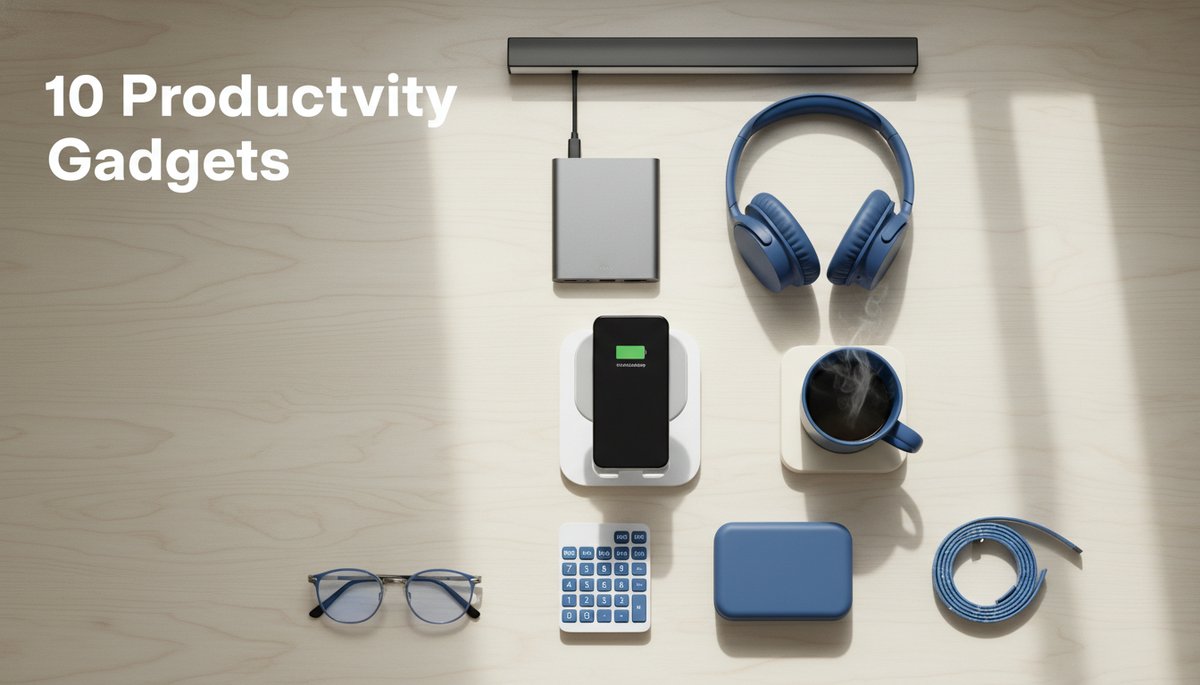
One laptop port rarely covers a real workday. An Anker USB-C 7-in-1 hub turns it into HDMI, USB-A, SD, and pass-through charging — so you dock with a single cable instead of juggling adapters every morning. It's the cheapest way to make a laptop behave like a desktop workstation. If you switch between a home desk and a coffee shop, a hub also means your whole peripheral setup reconnects with one plug instead of five.
2. Sony WH-CH720N Noise-Canceling Headphones
Background noise is a silent productivity tax. The Sony WH-CH720N headphones deliver active noise canceling and all-day comfort without flagship prices, and they double as a clean mic for meetings. On a tighter budget, the Anker Soundcore Q20 covers the basics well. Quiet ears mean a quieter mind — and faster deep work.
3. BenQ ScreenBar Monitor Light
Staring at a bright screen in a dim room is a recipe for afternoon headaches. The BenQ ScreenBar monitor light clips to your monitor, lights your desk without glaring back at you, and reclaims zero desk space. It's the single upgrade most remote workers feel within a day — and it also makes you look sharp on video calls.
4. Anker Wireless Charging Stand
A phone that's always at 12% is always a distraction. An Anker wireless charging stand keeps your phone upright, charged, and glanceable for two-factor codes and calls — no cable hunting. Propping it at eye level also keeps you from hunching over a flat phone on the desk, and it gives your phone a fixed home so it stops migrating into your hand mid-task.
5. Ember Smart Mug Warmer
Cold coffee is a tiny tragedy repeated daily. An Ember smart mug warmer holds your drink at a set temperature so you stop microwaving the same cup three times. If the Ember's price stings, a basic coffee mug warmer for the desk does the core job for a fraction of the cost. Fewer kitchen trips means fewer broken focus streaks.
6. Desk Cable Management Box
Cable chaos is visual noise, and visual noise is mental noise. A desk cable management box hides power strips and excess cord inside a clean enclosure, so your desk reads "calm" instead of "server closet." A tidy surface genuinely lowers low-grade stress over a long day.
7. ErgoFoam Adjustable Foot Rest
Lower-back ache by 3 p.m. is rarely the chair's fault alone — it's your legs. An ErgoFoam adjustable foot rest props your feet to a neutral angle, taking pressure off your hips and spine during long sitting sessions. Comfort isn't a luxury; it's how you stay productive past lunch.
8. Gunnar Blue Light Blocking Glasses
If your eyes feel sandpapery by evening, glare is likely the culprit. Gunnar blue light blocking glasses cut screen glare and visual fatigue for many people during extended sessions. Results vary by person, so treat them as a low-cost comfort experiment — but a worthwhile one if late-day screen strain is real for you.
9. Wireless Numeric Keypad
If you live in spreadsheets, a laptop's missing number row slows every entry. A wireless numeric keypad sits beside your trackpad and brings back fast data entry without committing to a full external keyboard. For analysts, bookkeepers, and anyone in Excel all day, it pays for itself in a week.
10. Govee LED Strip Lights
Lighting shapes mood, and mood shapes output. Govee LED strip lights tuck behind your monitor or desk to soften harsh contrast, reduce eye strain in the evening, and signal "work mode on, work mode off." A warm scene at 6 p.m. is a surprisingly effective way to actually log off.
Build the Upgrade That Fits Your Friction
You don't need all 10. Pick the gadget that fixes your most repeated annoyance — the squint, the tangle, the cold cup, the missing port — and start there. The best work from home productivity gadgets aren't the flashiest; they're the ones that quietly disappear into a better workday.
Ready for the bigger picture? Pair these accessories with the full home office essentials setup and build a desk that works as hard as you do.
Related Posts
AI + Careers Briefing — October 13, 2026

AI + Careers Briefing — October 12, 2026