Build a Productive Home Office Under $300
Build a Productive Home Office Under $300
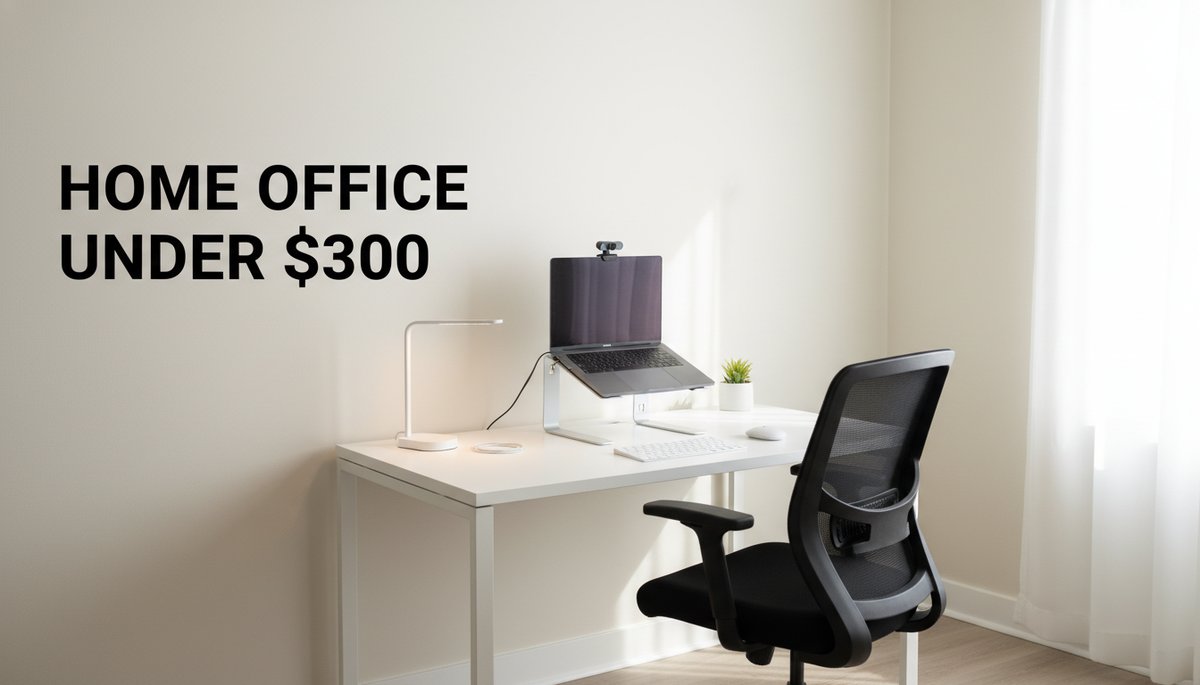
You don't need a $2,000 standing desk and a 4K monitor to do great remote work. You need a stable surface, a chair that won't wreck your back, a screen at eye level, and a camera that makes you look like you mean business. That's it. This is a home office setup under $300 — itemized, with a running total, so you know exactly where every dollar goes.
Disclosure: This post contains affiliate links. If you make a purchase through these links, we may earn a small commission at no extra cost to you. We only recommend products we genuinely believe in.
Quick Answer: A productive budget work-from-home setup runs about $258: a 40-inch desk ($60), an Amazon Basics mid-back mesh chair ($70), an aluminum laptop stand ($22), a wireless keyboard-and-mouse combo ($28), a 1080p webcam ($28), an LED desk lamp ($25), and a surge-protected power strip ($25). Swap in a SIHOO M57 ergonomic chair and the total rises to $308 — the chair is the one item to economize on if $300 is a hard ceiling.
This is the budget lane. If you want the full breakdown of monitors, mics, and dual-screen rigs, read the complete home office essentials guide — that's the pillar. Here, we're getting you working for under $300.
What "Under $300" Actually Buys You
A good budget home office setup covers four jobs: a place to work, a way to sit without pain, a screen at eye level, and a clean camera-and-light combo for calls. Skip anything outside those four and you're overspending.
We priced seven items below at typical 2026 Amazon listings. Your real-world total will move a few dollars with sales and color choices, but the math lands consistently under $300.
1. The Desk — $60
Start with a simple, sturdy work surface. A 40-inch top fits a laptop, an external screen later, and your elbows without crowding. The Need computer desk (40 inch) is a long-running budget pick — particleboard top, steel frame, assembles in about 20 minutes.
Running total: $60. Don't pay for a "gaming" desk with RGB you'll never use. Flat, stable, and the right height is all this job needs.
2. The Chair — $70 (or $120)
This is where you should spend the most, because you sit in it all day. Two honest options:
Budget: the Amazon Basics mid-back mesh chair at about $70 — breathable mesh back, adjustable height, perfectly fine for full workdays.
Upgrade: the SIHOO M57 ergonomic chair at about $120 — adjustable lumbar support and armrests, SIHOO's flex line, a noticeable step up for long-haul sitting.
We'll build the running total with the $70 chair to keep us comfortably under budget. Choosing the SIHOO instead adds $50 (more on that math at the end).
Running total: $130.
3. The Laptop Stand — $22
Working hunched over a laptop all day is the fastest route to neck and shoulder pain. The Soundance aluminum laptop stand lifts your screen to roughly eye level for about $22. Aluminum runs cooler than plastic, and it folds flat if you travel.
Running total: $152.
4. Keyboard and Mouse — $28
Once the laptop is up on a stand, you need an external keyboard and mouse so your hands stay at a neutral, comfortable height. The Logitech MK270 wireless combo is the reliable budget standard at around $28 — one tiny USB receiver, long battery life, no fuss.
Running total: $180.
5. The Webcam — $28
Your laptop's built-in camera films you from below at an unflattering angle. A standalone 1080p webcam at eye level changes how you show up on every call and interview. The NexiGo N60 1080p webcam clips onto your monitor or stand for about $28 and is one of the best value upgrades in this whole list.
Running total: $208. If you're still hunting for your first legit remote job, this single $28 buy will visibly upgrade your interview presence.
6. The Desk Lamp — $25
Good lighting does as much for your video quality as the camera. A front-facing LED lamp removes harsh shadows on calls and reduces eye strain in the evening. The TaoTronics LED desk lamp has adjustable brightness and color temperature for about $25 — set it cool and bright for focus work, warm for late hours.
Running total: $233.
7. Power and Cable Management — $25
Your desk, screen, lamp, and chargers all need outlets, and a cheap power strip with no surge protection is a false economy. The Anker power strip surge protector gives you multiple outlets plus USB ports and protects your gear for about $25.
Running total: $258.
The Math, All Together
Here's the full home office on a budget, 2026 edition:
Item | Price |
|---|---|
Need computer desk (40 inch) | $60 |
Amazon Basics mid-back mesh chair | $70 |
Soundance aluminum laptop stand | $22 |
Logitech MK270 wireless combo | $28 |
NexiGo N60 1080p webcam | $28 |
TaoTronics LED desk lamp | $25 |
Anker power strip surge protector | $25 |
Total | $258 |
That's $42 under $300. Want a better chair? Swap the $70 Amazon Basics seat for the SIHOO M57 ($120) and your total becomes $308 — barely over. If $300 is a hard ceiling, keep the budget chair now and upgrade it first when you have spare cash; the chair is the easiest single line to move in either direction.
Where to Put Your Next Dollars
Once this core is in place, you have a setup that handles real client calls, interviews, and full workdays. From here, the highest-value adds are an external monitor and a basic USB mic. When you're ready, these productivity gadgets to add once you've got the basics are the logical next step.
But you don't need any of that to start. Build the $258 core this week, get to work, and let the job — not the gear — pay for the upgrades.
Related Posts
AI + Careers Briefing — October 13, 2026

AI + Careers Briefing — October 12, 2026