Best Home-Office Upgrades for Remote Workers (2026)
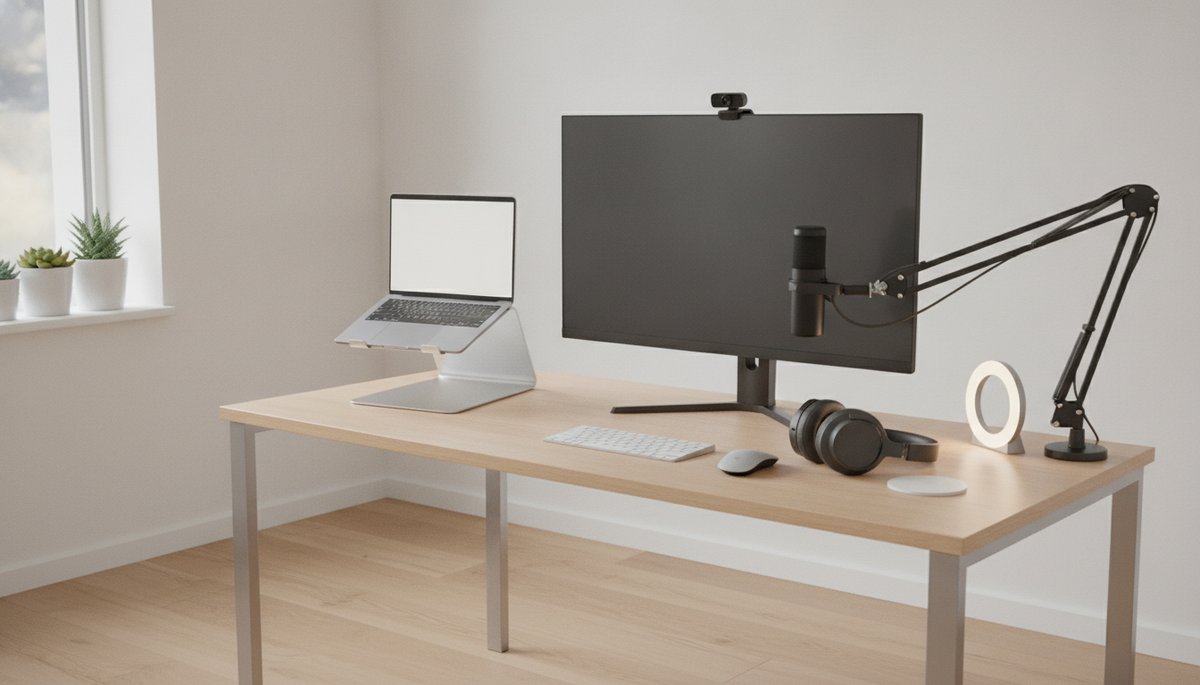
Prime Big Deal Days picks for your home office
Amazon's fall Prime Big Deal Days is expected in early-to-mid October 2026 (exact dates aren't confirmed yet). These five are the upgrades we'd add to a list first.
- Logitech C920S HD Pro Webcam — sharp 1080p video so you look prepared and polished in every video interview and team call. Check price →
- Sony WH-1000XM5 noise-cancelling headphones — silence a noisy home so you can focus on deep work and sound clear on calls. Check price →
- Logitech Litra Glow LED light — even, flattering light that fixes the single biggest thing wrong with most home-office video setups. Check price →
- Rain Design mStand laptop stand — raises your screen to eye level so your neck, posture, and on-camera angle all improve at once. Check price →
- Blue Yeti USB Microphone — broadcast-clear audio that makes you easy to listen to in interviews, meetings, and recorded calls. Check price →
Affiliate links — we may earn a commission at no extra cost to you. Full list below.
Disclosure: This post contains affiliate links. If you make a purchase through these links, we may earn a small commission at no extra cost to you. We only recommend gear we genuinely believe earns its place in a professional home-office setup.
If you work remotely, run a job search from your desk, or do both at once, this fall is a smart time to get your setup in order. Amazon's Prime Big Deal Days, its second major sale of the year, is expected in early-to-mid October 2026, and the gear that quietly shapes your workday, the webcam on your interview calls, the headphones that get you through focused work, the stand that saves your neck, tends to be exactly the kind of mid-priced tech that goes on sale.
This is not about chasing a countdown clock and panic-buying. It's about deciding now which upgrades genuinely make you more productive and more polished on camera, adding them to your list, and letting the deals come to you. Below is the home-office gear we'd put on that list. All of it is proven, and every piece earns its place by paying off in real work, not just on sale day.
A quick framing before the picks: the strongest argument for upgrading your home office right now is that the same gear does double duty. The webcam, mic, and light that make you sharp in a Monday standup are the exact same tools that make you look prepared in a Thursday job interview. You're not buying separate kits for work and the job hunt, you're investing once in how you show up.
When is Amazon Prime Big Deal Days 2026?
Amazon's fall sale, officially called Prime Big Deal Days, is expected in early-to-mid October 2026 — Amazon hasn't announced the exact 2026 dates yet. The event has landed in almost the same window each of the past two years: October 8-9 in 2024 and October 7-8 in 2025, so a similar early-October slot is the safest bet again this year.
For remote workers, an October sale lines up naturally with a home-office refresh. It falls right as most companies settle into the fourth quarter, when meeting schedules pick back up and a good share of the year's interviews and performance reviews land on the calendar, a good moment to already have your webcam, audio, and desk setup sorted rather than scrambling before a call.
Do I need a Prime membership to shop Prime Big Deal Days?
Yes. Prime Big Deal Days deals are exclusive to Amazon Prime members, so you'll need an active membership to see event pricing. Amazon offers a free trial, which is why a lot of people sign up shortly before the event and shop within the trial period. If you're not sure you'll keep it, set a reminder to cancel before the trial renews so you're never paying for a service you don't use.
What home-office gear is worth buying during Prime Big Deal Days?
The honest answer is: the gear you touch every single working day. Flashy accessories sit in a drawer; a good webcam, comfortable headphones, and a stand that fixes your posture get used for hours. Below are the upgrades that consistently earn their keep for remote workers and job seekers, in rough order of impact.
A 1080p webcam for video interviews and daily calls
Start here, because it's the single upgrade that changes how other people perceive you. The webcam built into most laptops is a small, low-light sensor that produces grainy, washed-out video, and on an important call that quietly works against you. An external 1080p camera makes you look sharp, evenly exposed, and present.
The Logitech C920S HD Pro Webcam has been the default recommendation in this category for years. It shoots full 1080p at 30fps, handles autofocus and light correction so you don't have to fiddle with settings, and includes a built-in privacy shutter you can slide closed when the camera's not in use. It works with Zoom, Teams, Google Meet, and effectively every other platform you'll be asked to use. If you only upgrade one thing before your next interview, make it this. Watch for deals during the sale window rather than assuming a specific discount, and check the current price before you buy.
Noise-cancelling headphones for focus and clear calls
A home office is full of interruptions a real office doesn't have: a partner on their own call, a delivery, traffic, a neighbor's dog. Noise-cancelling headphones give you back the quiet you need for deep, uninterrupted work, and they make you sound dramatically better on calls because their microphones can focus on your voice instead of the room.
The Sony WH-1000XM5 is widely regarded as one of the best at active noise cancellation, with a comfortable over-ear fit you can wear for a full workday and around 30 hours of battery life per charge. For anyone whose calendar is mostly meetings, or who needs to disappear into focused work for a few hours, this is the kind of tool that quietly raises the quality of everything you produce. Since you'll be putting them on and taking them off all day, a dedicated stand keeps them within reach instead of sliding around the desk; our review of the Heavy Metal Headphone Stand covers what to look for in one.
A video-call light so you're always well lit
Lighting is the most under-rated part of any home-office video setup. You can have the best webcam on the market and still look dim and flat if you're sitting with a window behind you. A dedicated light fixes that in seconds.
The Logitech Litra Glow is a compact LED light designed specifically for video calls and streaming. It clips onto your monitor, throws soft, even light that's easy on the eyes, and lets you adjust brightness and color temperature so you look natural rather than over-lit. Pair it with the webcam above and you've solved the two things, sharpness and light, that decide whether you look professional on camera. This pairing is worth real attention if you have interviews coming up; our guide to preparing for a technical interview in 2026 goes deeper on the rehearsal side, but a clean visual setup is the foundation that makes the rest land.
A laptop stand to fix your posture and your camera angle
If you work on a laptop sitting flat on a desk, you're looking down all day, which is rough on your neck and produces the worst possible webcam angle for video calls (nobody looks their best shot from below). Raising the screen to eye level solves both problems at once.
The Rain Design mStand is a single, sturdy piece of aluminum that lifts your laptop to a comfortable height and doubles as a heat sink to help it run cooler. It pairs naturally with an external keyboard and mouse (below), since once the screen is up at eye level you'll want your hands at desk level. It's a small, one-time purchase that pays off every hour you sit down to work.
An ergonomic keyboard and mouse for long working days
Once your laptop is up on a stand, you'll want an external keyboard and mouse so your wrists and shoulders sit in a natural position. This is the upgrade your body thanks you for after a few long days of typing.
The Logitech MX Keys S is a low-profile wireless keyboard built for quiet, comfortable typing, with backlighting and the ability to pair with several devices at once, handy if you switch between a work laptop and a personal machine. Alongside it, the Logitech MX Master 3S is an ergonomic wireless mouse with quiet clicks and fast scrolling that's a genuine pleasure to use across long sessions in spreadsheets, docs, and a browser full of tabs. Neither is essential the way the webcam is, but together they turn a cramped laptop setup into a proper workstation. Once you've added a stand, keyboard, mouse, mic, and light to one desk, cable clutter becomes its own problem; the Moment Everything Mini Tech Organizer is worth a look if you'd rather corral all of it into one tidy spot than fight a tangle of cords every morning.
A USB microphone for interviews and meetings
Audio is the half of video calls people forget about, and yet it's the thing that most affects whether you're easy to listen to. Laptop and headset mics are fine for a quick check-in, but for interviews, presentations, or any call where you're doing a lot of the talking, a dedicated mic makes you noticeably clearer and more authoritative.
The Blue Yeti USB Microphone is a plug-and-play condenser mic that delivers broadcast-quality sound without an audio interface or any setup beyond plugging in the USB cable. It has multiple pickup patterns, so you can dial it in for a solo interview or a recorded call. If most of your calls happen on video and you'd rather mount a mic to a camera or a small boom than sit a desk mic in frame, the RØDE VideoMic GO II is a genuinely good option for clean video-call audio without a full podcasting setup. If your work involves a lot of speaking, or you're preparing for interviews where every answer counts, one of these two upgrades is what makes sure the message actually lands.
Is a webcam upgrade worth it for video interviews?
Yes, and it's arguably the highest-return purchase on this list for anyone job hunting. Interviewers form an impression in the first few seconds, and grainy, dim laptop video subtly signals "unprepared" before you've said a word. A sharp 1080p webcam paired with a simple light flips that: you arrive looking clear, well lit, and in control of your environment.
It's worth being clear about what gear can and can't do. A good camera and mic make you look and sound your best, but they don't replace preparation. The substance still has to be there, which is why it pays to pair a setup upgrade with real practice. If you're heading into interviews this fall, work through a structured plan like our technical interview prep guide and keep sharpening the skills that actually move your career forward, the kind we cover in the skills that matter most as AI reshapes work. The gear is the frame; your answers are the picture.
How to shop Prime Big Deal Days without overspending
The trap with any big sale is buying things because they're discounted rather than because you need them. A few simple rules keep a home-office refresh focused and worthwhile.
First, make your list before the event, not during it. Decide which of the upgrades above genuinely improves your workday and write those down. When the deals go live, you're checking prices on a known list instead of browsing and getting talked into extras.
Second, prioritize by how often you'll use each item. The webcam, headphones, and stand get used every working day, so they're worth buying even at a modest discount. The mic and lighting matter most if you do a lot of speaking or have interviews coming up. The keyboard and mouse are comfort upgrades, lovely to have, easy to defer if the budget's tight.
Third, treat it as an investment in output, not a shopping spree. Every item here is a tool that makes you either more productive or more polished, which is exactly the lens to buy through. If you're thinking about your setup as part of a bigger professional push, like landing a more senior or fully remote role, it's worth reading how to land a remote product management job in 2026 for a sense of how a strong, professional presence fits into the wider picture.
The bottom line
Prime Big Deal Days 2026 is expected in early-to-mid October, and it's a genuinely good window to upgrade the gear that shapes how you work and how you come across on camera. The smartest approach is also the simplest: decide what you actually need first, build your list now, and buy on need rather than hype, checking the current price rather than assuming any specific discount.
If you do nothing else, sort out the webcam and a light before your next interview, and add headphones and a laptop stand for the daily grind of remote work. Those four upgrades cover the things that matter most, looking and sounding professional, and protecting your focus and your posture, and they'll keep paying off long after the sale ends.
Our Top Picks

Everything Mini Tech Organizer - Open Box, Workwear
The micro tech pouch for those who like to pack light. We’ve used our fair share of tech organizers and realized bigger isn’t always better. Not only does this one take up less space in your bag, it has just enough room for your essentials. With simple organization, it provides just enough storage t

Heavy Metal Headphone Stand - Open Box, Black
<p>Your headphones deserve to stand. With the LAB22 Float Headphone Stand, they can do that in style. More than a tech accessory, it’s a sculptural object that gently holds your headphones above the fray. Freeing up desk space while protecting your headphones from damage. </p>

VideoMic GO II Lightweight On-Camera Shotgun Microphone
<p>The VideoMic GO II is designed to make capturing incredible audio incredibly easy. Ultra-lightweight and compact, with powerful features that are simple to use, it is perfect for all forms of content creation with a camera, smartphone or tablet, or computer. It’s time to take your content to the
Frequently Asked Questions
When is Amazon Prime Day 2026?
What home-office gear is worth buying on Prime Day?
Is a webcam upgrade worth it for video interviews?
Do I need a Prime membership to shop Prime Day 2026?
Should I wait for Prime Day or buy home-office gear now?
Related Posts
AI + Careers Briefing — November 2, 2026
AI + Careers Briefing — November 1, 2026